
Product
Replace your CMS without a big bang: the strangler fig pattern with Enterspeed

Jesper Weber
Developer Experience Engineer at Enterspeed
This is part 2 of our series on design patterns in Enterspeed. If you missed part 1, start with the canonical format pattern. Stay with us: next up is the content enricher.
At some point, every CMS gets old. The licence gets more expensive, the version you're on goes out of support, or the editors simply need something better. So you decide to move to a new CMS.
That's usually where the pain starts.
The traditional approach is the big-bang migration. You build the new solution next to the old one, freeze content for a period, migrate everything and switch over on launch day. If something goes wrong, it goes wrong for everything at once, and rolling back is rarely a real option.
There's a better way, and it's named after a tree.
In this blog post we use the CMS as an example, but of course this could be any system in your company that exposes data to a client application.
The strangler fig pattern was named by Martin Fowler after a type of fig that grows around a host tree. The fig starts small, gradually grows around the host, and eventually the host tree is gone, and the fig stands on its own.
Applied to software, the idea is simple. Instead of replacing a legacy system in one go, you:
Put a facade in front of the old system, so consumers stop talking to it directly.
Move functionality to the new system one piece at a time, behind the facade.
Retire the old system when nothing depends on it anymore.
Short version: consumers keep calling the same thing, while what's behind it slowly changes.
The facade is the whole trick. Without it, every piece you move means changing every consumer that used it.
Let's look at a fairly typical setup. The old CMS holds pages, news, blog posts and a handful of other content types, and it's consumed by the website, a mobile app and, more and more often, AI agents.
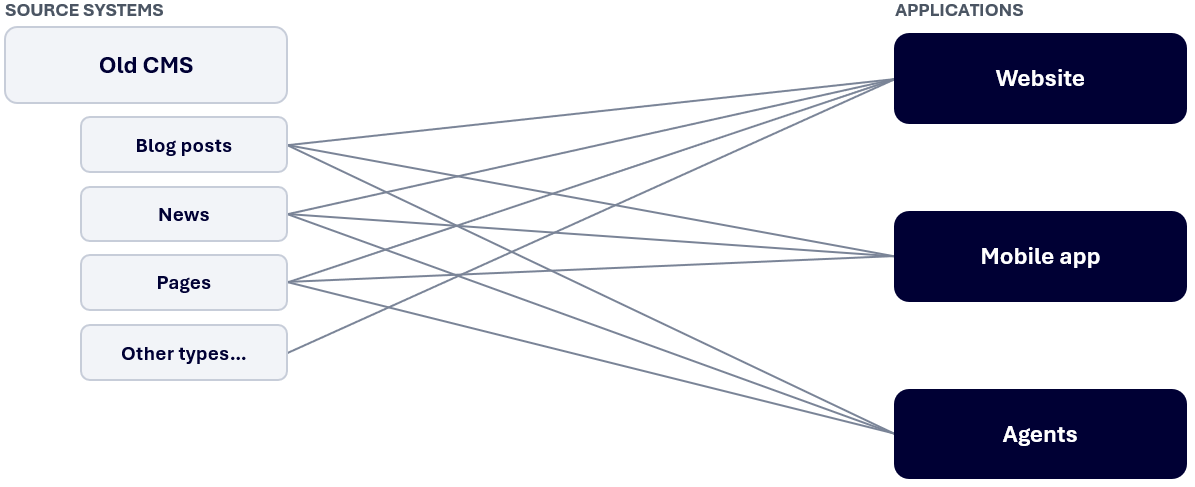
Every application is coupled directly to the old CMS: its API, its data structure and its field names. If you want to move blog posts to a new CMS, every application that shows blog posts needs to learn a new API and a new data model. And then you do it all again for news. And for pages.
That's why most teams end up with a big-bang migration. Not because they want to, but because there's no facade to hide the change behind.
In the previous post in this series, we looked at the canonical format pattern and how Enterspeed acts as the canonical layer between your source systems and your applications. That same layer is exactly the facade the strangler fig pattern needs.
Applications don't talk to the CMS. They talk to Enterspeed through the Delivery API, the Query API or the Query MCP, and they get views shaped by schemas. As long as the views keep the same structure, the applications don't care where the data comes from.
So the migration looks like this:
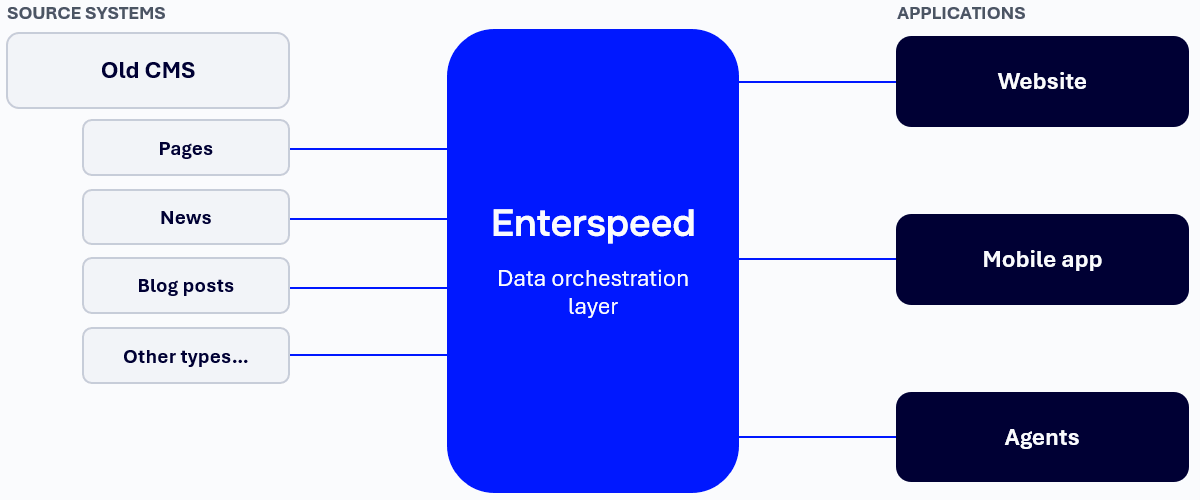
Put Enterspeed in front of the old CMS. Ingest the content from the old CMS into its own source group and move the applications over to Enterspeed. Nothing changes for editors yet.
Add the new CMS as a new source group. It can start ingesting content alongside the old CMS.
Move one content type at a time. Start with something low-risk, like "other types", then blog posts, then news. For each one, point the schema at the new source group and keep the output the same.
Retire the old CMS. When the last content type has moved, nothing depends on the old CMS anymore, and you can switch it off.
At no point do the website, the mobile app or the agents need a coordinated release.
Let's say blog posts are next in line. In the old CMS, a blog post schema could look something like this:
1/** @type {Enterspeed.FullSchema} */
2export default {
3  triggers: function(context) {
4    context.triggers('oldCms', ['blogPost']);
5  },
6  routes: function(sourceEntity, context) {
7    context.url(sourceEntity.url);
8  },
9  properties: function (sourceEntity, context) {
10    return {
11      title: sourceEntity.properties.headline,
12      teaser: sourceEntity.properties.summary,
13      body: sourceEntity.properties.bodyText
14    };
15  }
16}
When blog posts move to the new CMS, the data structure is probably different. Maybe headline is now called title, and the body is a set of blocks instead of a single rich text field. So you update the triggers and the mapping, but keep the output the same:
1/** @type {Enterspeed.FullSchema} */
2export default {
3  triggers: function(context) {
4    context.triggers('newCms', ['blogPost']);
5  },
6  routes: function(sourceEntity, context) {
7    context.url(sourceEntity.url);
8  },
9  properties: function (sourceEntity, context) {
10    return {
11      title: sourceEntity.properties.title,
12      teaser: sourceEntity.properties.teaser,
13      body: context.partial("richTextBlocks", sourceEntity.properties.content)
14    };
15  }
16}
The view still has title, teaser and body. The website renders it exactly as before. Deploy the schema, and blog posts are now served from the new CMS.
That's the whole migration step for one content type. Repeat for the next one.
The pattern removes the big bang, but it doesn't remove the need for planning. A few things are worth thinking about before you start.
Routes can only have one owner. If the old and the new CMS both publish a blog post with the same URL, and both are picked up by a schema, you end up with a duplicate route. Make sure only one schema claims a content type at any given time. Moving the trigger from the old source group to the new one, as in the example above, handles that.
URLs might change. If the new CMS uses a different URL structure, ingest the old URLs as redirects on the new source entities. Enterspeed applies them to the view, and a request to the old URL returns a redirect response instead of a 404.
Content will reference across systems. During the migration, a blog post in the new CMS might reference an author page that still lives in the old CMS. References and lookups can point to another source group, so cross-system relations keep working while the migration is in progress.
Test in a lower environment first. Schemas are deployed per environment, so you can move a content type in your development or staging environment, check the output, and then deploy to production. And if something turns out to be wrong, rolling back is a matter of redeploying the previous schema version.
Don't let "temporary" become permanent. A migration that can be done step by step can also be paused, and a paused migration has a way of sticking around. Agree on the order and the timeline up front, and plan when the old CMS will actually be switched off.
Big-bang CMS migrations are risky because every application is coupled directly to the system you're replacing. The strangler fig pattern solves that by putting a facade in front of the old system and moving things over one piece at a time.
With Enterspeed as your canonical layer, that facade is already there. Each content type moves by changing a schema, not by coordinating a release across every application. Editors can start using the new CMS for one content type while the rest stays where it is, and the old CMS is retired when nothing depends on it anymore.
No launch weekend required.
Remember to check out the other blog post in this series:
Part 1: The canonical format
Loves building software that makes an impact on businesses. Untalented but happy ice hockey player (the beers just taste better in a locker room after a game...)

© 2020 - 2026 Enterspeed A/S. All rights reserved.
Made with ❤️ and ☕ in Denmark.