
Guides & Tutorials
Enterspeed and n8n: Data orchestration meets workflow automation

Attila Tonács
Content & Demand Marketer at Enterspeed
Ever had a system that holds something important and connects to nothing else?
Everyone has one: the PIM with the only complete product record, behind an API nobody's had time to wire up, or the supplier feed that lands as a CSV on an FTP server at 2am. The real problem is that so many workflows depend on it downstream that a single change can break all of them at once.
Unfortunately, it rarely gets fixed, because the old answer is a custom integration, that is built once per destination. And if you make it five sources and five destinations, it is suddenly twenty-five connections to maintain.
Workflow automation isn't new, but n8n took a different route: you can self-host it, so your data and credentials stay on the infrastructure you control, and when the visual builder is not enough, your technical people can fall back on code.
The name itself tells the story of how it works. n8n is short for "nodemation" put together from "node" and "automation". You build by putting nodes – each standing for a task – on a canvas and joining them up to automate the workflow. It takes away the integration code you'd otherwise maintain for every pair of systems, and it also gives you a safe and controlled way to put AI into a process.
Enterspeed is now one of the thousands of integrations n8n can reach, which means the synergies of data orchestration and workflow automation are available on the same canvas. n8n is where data comes in from almost anywhere, and Enterspeed is what makes that data consistent and fast to read back out.
Without a layer in the middle that is Enterspeed, every workflow touching data tends to do its own modelling: the same field mapping, the same missing values, the same rules, buried in a code step and invisible to every other workflow that needs it. With Enterspeed, the data lives in a view built from a pre-defined schema. If you rename a field upstream, you only need to change the schema, and not eleven workflows.
Let’s say a storefront, an app, a marketplace feed and a support assistant all need the same product data, spread across a PIM, an ERP, a DAM and a spreadsheet.
Without n8n | With n8n | With n8n and Enterspeed | |
A source with no connector | A development ticket. | Pick the node, add the credential. | Same, and the data lands where everything else can read it. |
Where a field gets fixed | In the integration code, once per destination. | In a code step, inside one workflow. | In one schema, read by every workflow |
A field gets renamed | Every integration using it breaks. | Every workflow using it breaks. | One schema changes. |
Also check out: What is Enterspeed Core?
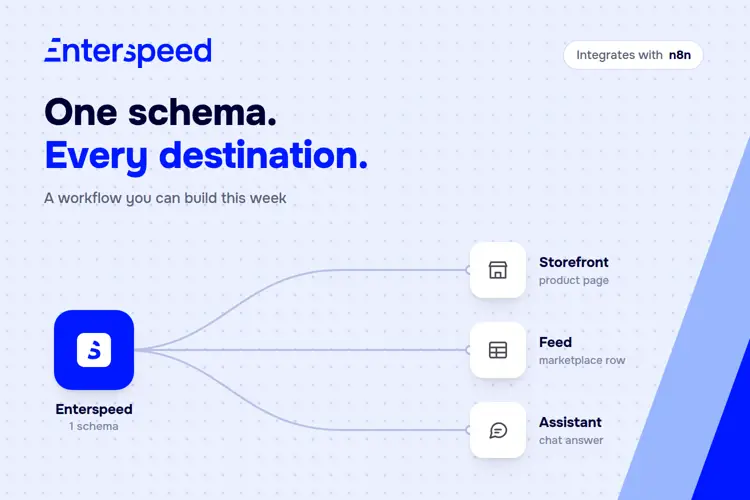
Imagine the same product that needs to show up in three different places: the storefront page, a row in the marketplace feed, and the answer a support assistant gives when someone asks if the product is in stock. Normally that's three separate trips back to the source system, and three chances to get the mapping wrong in three ways.
Below you can see an interactive illustration of the actual workflow we built in our own demo environment: one query returns consistent fields, and each n8n branch formats them for its destination.
Storefront gets a heading, a price and a spec list. The feed gets one row. The support assistant gets a sentence: "The Trailblazer Hiking Sneaker by TrailForm is in stock. It costs 899 DKK excluding VAT."
None of these steps know how the PIM stores the data. They only know the schema's field names, listed right there in each output. If you rename a field at the source, only the schema needs to be changed in Enterspeed instead of three workflows.
We recommend someone technical builds the first workflow, and the person who owns the outcome runs it, changing the filter, the schedule and the destination. The developers don't go away: they build it once, but they don't have to be in the loop for every change afterwards.
The install is a one-time job for the owner or an admin of your n8n instance. You can either do it on n8n Cloud, straight from the nodes panel, or you can self-host it. The latter needs an npm install to get started - though you're then running and maintaining that instance yourself. The setup needs one credential holding two keys: a source API key to write data into Enterspeed, and an environment API key to read it back out through Delivery, Query and Routes. Full walkthrough in the docs.
We built one integration with n8n. It came with a thousand more. What that buys you isn't another connector on a list, it's the end of picking which systems are worth connecting at all. The connector that doesn't exist yet is no longer a reason to wait. 🚀
See the integration → Enterspeed on n8n.io
How to set it up → Enterspeed docs
Want to see it on your own data? → Book a demo

© 2020 - 2026 Enterspeed A/S. All rights reserved.
Made with ❤️ and ☕ in Denmark.