
Guides & Tutorials
Ask your data anything: a hands-on demo of the Enterspeed Query MCP

Jesper Weber
Senior Software Engineer at Enterspeed
Your data already lives in Enterspeed – products from your PIM, orders from your ERP, customers from your CRM, all sitting in one fast, clean layer. But here’s the thing: until now, getting answers out of it meant writing queries. What if you could just… ask? 🤔
That’s exactly what the Enterspeed Query MCP unlocks. In this post we’ll wire Claude up to a real Enterspeed environment, point it at data ingested from three different source systems, and let it answer questions in plain English – no query language required.
Short version: the Enterspeed Query MCP turns the Enterspeed Query API into a set of Model Context Protocol (MCP) tools that AI clients like Claude, Cursor, Azure AI Foundry or custom agents can discover and call on their own.
When you ask your AI client a question and it decides that one of the Enterspeed Query MCP tools can help provide data to answer the question, the requests for the Query MCP are forwarded to the Enterspeed Query API. Depending on the question it can be a single or multiple queries in multiple indexes, making it possible to answer question that need to cross check data from multiple different sources.
For this demo we ingest data into Enterspeed from three different source systems – a common setup for many commerce setups:
ERP – orders and order lines
PIM – products
CRM – customers
In the demo here, we will setup everything needed in Enterspeed (which is not that much) and then build a simple chat application in Node.js that uses Claude and connects it to the Enterspeed Query MCP on your specific Enterspeed tenant.
Before we continue with the actual implementation, make sure to go grab the demo repo on GitHub, which contains the chat application as well as the demo data and Enterspeed schemas used in the demo.
Now, let’s go 🚀
What’s needed inside Enterspeed is very simple and only take a few minutes to setup.
As mentioned above, the setup uses data from three sources to mimic a real-life setup. So, in Enterspeed simply go and create three source groups called ERP, PIM, and CRM, each with a single source where you get the source API key needed to ingest the data.
Inside the GitHub repo you find a file called demo-data.mjs. Open the file and paste in the source API keys you just created.
Once this is in place, open a terminal and run the following command to start the ingest of all the demo data:
node demo-data.mjs
Next, create index schemas for each of the types you want to expose in the Query MCP. Those are the standard index schemas you’d use with the Enterspeed Query API.
So, go ahead and create four index schemas called orderIndex, orderLineIndex, productIndex and customerIndex. The content of the schemas can be found in the GitHub repo in the folder called enterspeedSchemas, so simply copy and paste the content.
The last step is to create an Environment client which is needed in the chat application to connect the Enterspeed Query MCP.
Make sure to give the Environment client access scope for the Query API and the MCP server else the Query MCP is not allowed access to your indexes. You can also configure the Environment client to only have access to specific indexes if you don’t want to expose all indexes through the Query MCP.
That’s it. That’s everything needed inside Enterspeed.
The client application is a simple chat UI that connects Claude to the Enterspeed Query MCP server – you type a question, Claude calls the MCP tools, and the answer comes back grounded in your real data across multiple sources.
Besides a single UI page created in HTML, CSS and plain JavaScript, the application consists of three files:
server.ts – The server exposes a single chat HTTP endpoint that is called whenever you make a question.
chatHandler.ts – The handler is called from the chat HTTP endpoint and calls Claude using the @anthropic-ai/sdk package.
mcpClient.ts – The mcp client hooks up the Enterspeed Query MCP server using the @modelcontextprotocol/sdk package and is being called by the chatHandler.ts
That’s all the code needed. Checkout the repo if you want to see the concrete implementation.
When you open the demo, you see a clean chat box and a handful of starter questions – this is example questions that a merchandiser would actually want to know, but would normally have to ping a developer for:
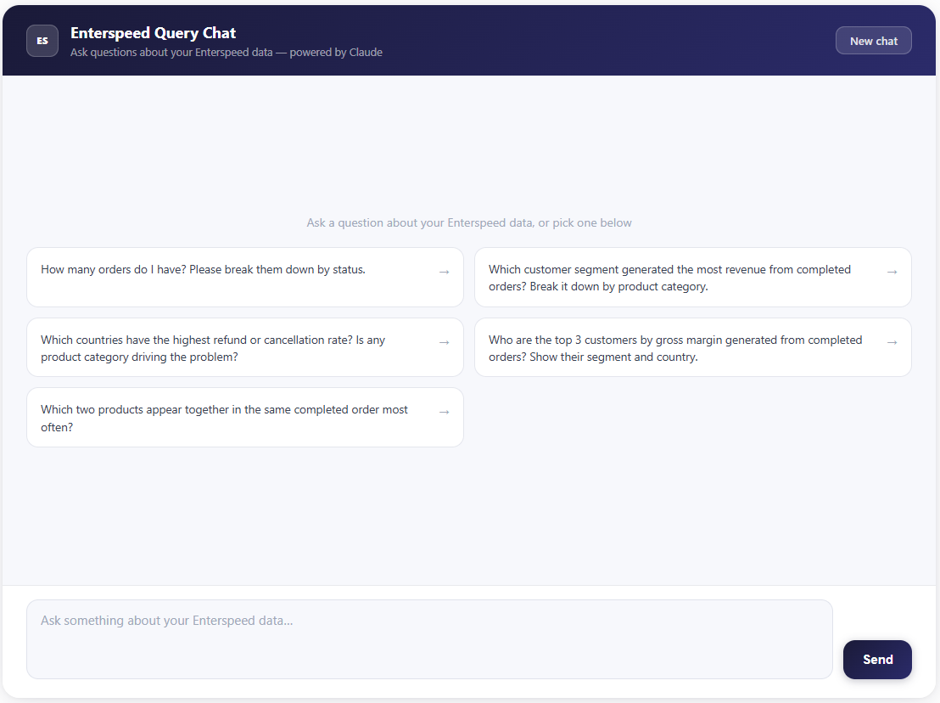
Let’s start simple and pick the first one: “How many orders do I have? Please break them down by status.” Behind the scenes, Claude reads the question, figures out it needs the orders index, calls the right MCP tool to query and facet the data, and writes up the answer.
Here’s what comes back:
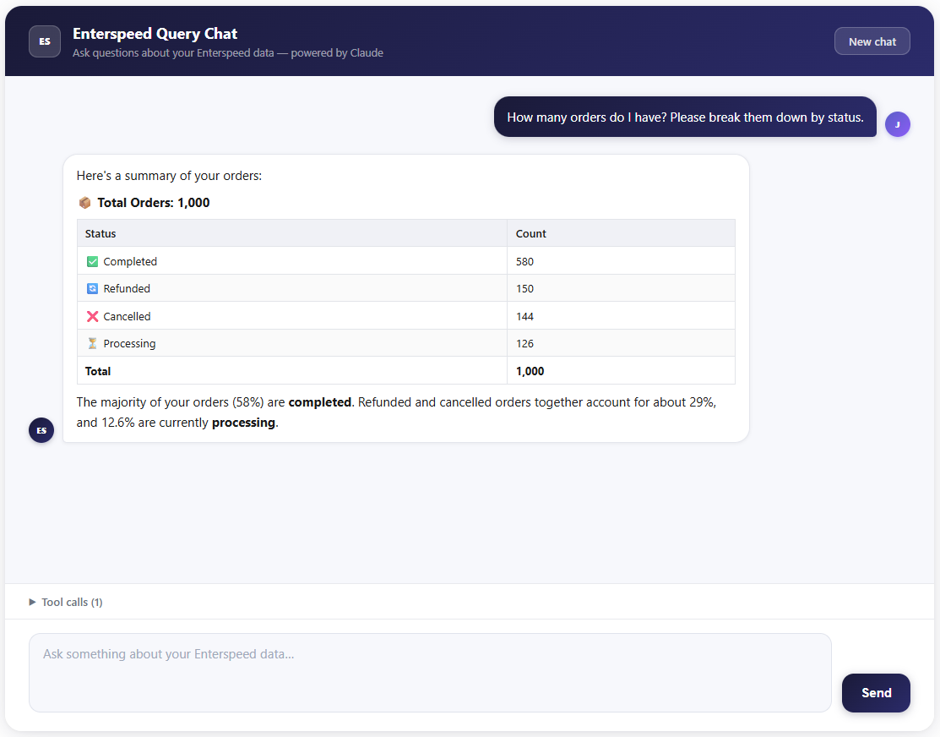 All 1,000 orders, neatly bucketed: 580 completed, 150 refunded, 144 cancelled, and 126 still processing – with a one-line read on what it means (the majority are completed; refunds and cancellations together account for roughly 29%). No SQL, no Query API payload, no jumping into a BI tool. Just a question and an answer. 🎉
In this case, the question was straightforward. All the data needed was in the orderIndex, so Claude only had to look up a single index to return the result.
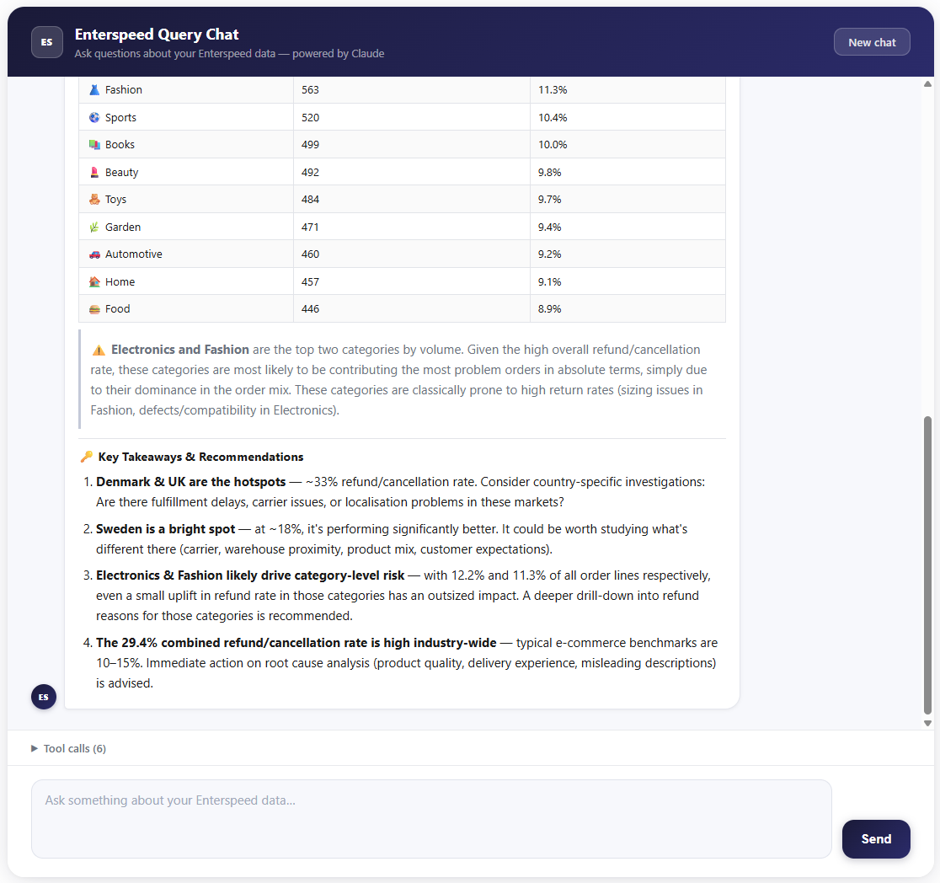
If we ask another question like this one: “Which countries have the highest refund or cancellation rate? Is any product category driving the problem?” Claude would neeId to cross-check data and do multiple queries to get data for both orders, customers, and products.
But even this question is answered nicely as the Enterspeed Query MCP exposes tools for all available indexes.
AI is only as good as the data behind it. Enterspeed already does the unglamorous part – it connects your backend systems into one clean, structured, fast data layer. The Query MCP simply opens that layer to AI clients in a governed way: scoped keys, index restrictions, read-only access, all enforced by the Query API.
This means is that your developers no longer need to build one-off BI queries or custom HTTP endpoints every time someone needs a specific answer. Instead, the Enterspeed Query MCP exposes all your data from across source systems – giving merchandisers and analysts the freedom to ask whatever they need, without requiring logins to multiple systems. All they need is read only-access through the Query MCP.
And we’re not stopping here. We’re already working on a Management MCP – one that lets you manage everything inside your Enterspeed tenant straight from your AI client. Spinning up schemas, tweaking environments, wiring up sources – all from the same conversation. More on that soon. 👀
Check out this hands-on demo for a thorough walk through:
Spin up the demo repo at our GitHub, read the Query MCP Server docs to wire up your own environment, and let us know what you end up asking your data. We think you’ll like the answers. 🚀
Loves building software that makes an impact on businesses. Untalented but happy ice hockey player (the beers just taste better in a locker room after a game...)

© 2020 - 2026 Enterspeed A/S. All rights reserved.
Made with ❤️ and ☕ in Denmark.